IVSIM, Interface Validation Simulation Tool
Simulate. Validate. Integrate.
IVSIM is an interface simulator for integration platforms. It supports the development of equipment interfaces by simulating OPC-UA values, events and other interface interactions, without requiring the real equipment.
Trial licenses available
Key features
No installation required
The software is delivered as a bundle. After unzipping it on the server and adjusting a few basic settings in the config files, IVSIM can be started directly.
OPC-UA and MES simulation
Integrated OPC-UA server with all standard data types, OPC-UA browser, equipment event simulation, and message-based communication via the MSI interface.
Reduced tool dependencies
By reducing the dependency on tools such as an OPC-UA client or PAS-X, more end-to-end tests become possible before validation.
Reproducible test environments
Configurations can be frozen using hash sums. This ensures consistency and integrity of the test environment throughout the entire update process.

Common challenges in interface development
Interface development for new equipment usually has to begin before the machine is delivered to site. Without a counterpart to communicate with, OPC-UA values, equipment events, and L2 messages cannot be tested end-to-end. At the same time, a complete end-to-end test typically requires all integration environments and access to the real equipment in parallel. This combination is rarely available in early project phases, which limits the number of tests that can realistically be carried out before validation.

Challenges during operation and upgrades
Recreating complex error scenarios on real equipment is time-consuming. It often requires restoring system backups and scheduling downtime on the line, with no guarantee that the original timing will repeat. The same effort applies after each integration platform upgrade, when the communication for every connected use case has to be verified again. Without a defined and reproducible reference environment, this is largely a manual exercise that has to be repeated for every release.
How IVSIM addresses these challenges
IVSIM is designed to support the entire use case lifecycle, from preparing the interface before the real equipment is available, through upgrades, to troubleshooting. It acts as an Interface-Twin: it simulates the interfaces between SAIL and the equipment so that interface logic can be developed and tested without the real equipment or other integration platforms.
Each variable can be configured as either a Standalone or a Mirrored node, without changes to the OPC-client logic. This allows interface tests to be carried out either fully simulated or against real equipment, depending on the development phase.
Configurations are file-based and can be frozen using hash sums. The same scenario can therefore be re-executed after a integration platform upgrade, supporting consistency and integrity of the test environment throughout the entire update process.
Features
A closer look at the four functional areas of IVSIM.
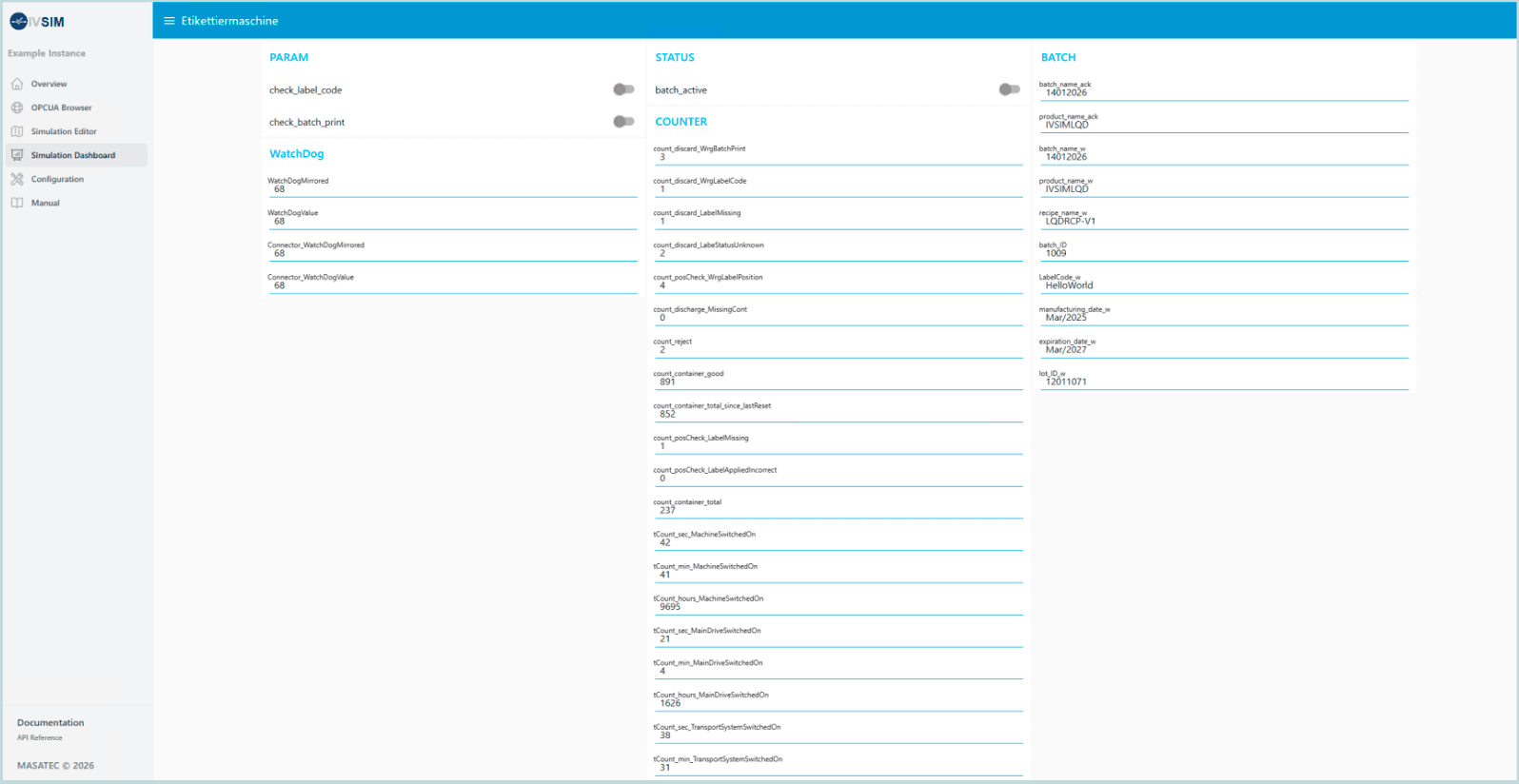
Simulation Dashboard
The simulation dashboard is the user interface for interaction with the simulation. Each piece of equipment has its own page, structured into groups such as Command, Status, Parameter, Counter, and WatchDog. Tag values can be read and written using switches, sliders, gauges, and input fields. The dashboard can be embedded in existing HMIs via iFrame.
Getting started with IVSIM
From software bundle to a running simulation in four steps.
1. Request licenses
Request the desired number of licenses via the form below.
2. Unzip and configure
Save the delivered software bundle on the simulation server and unzip it. Adjust the config files.
3. Start IVSIM
Run IVSIM.exe from the command line. For hosts with multiple instances, any IVSIM Instance can be registered as a Windows service.
4. Build scenarios
Use the configuration page to generate node sets, dashboards, and event types from the provided CSV templates. Import the example flows, configure endpoints, and begin sending and receiving data/messages.
Learn more about IVSIM
If you would like more information about IVSIM or a non-binding trial license, please use the form below. We are happy to answer questions about installation, configuration, or specific use cases.
No installation required, no system changes
Works with or without real equipment
Reproducible test environments